What Google’s Antigravity taught me about SEO for agentic web

I recently switched to Google’s Antigravity IDE to continue a side project because I was tired of wrestling with Claude Code’s token limits. But what I didn’t expect to uncover in a frustrating debugging session was a live view of how AI agents actually search.
I know you could use the DevTool in Chrome Browser’s network tab to inspect fan-out queries; however, nothing beats seeing all the internal query logic, the reasoning loops, and the step-by-step narrowing toward an answer in real time. It’s like peeking into a room you’re not supposed to be in. Here’s what happened.
My AI agent ran into a loop of broken GitHub OAuth flow while attempting to integrate Keystatic (an open-source CMS) with my Astro project. GitHub kept redirecting my auth callback to localhost instead of my Vercel deployment URL. After several unsuccessful attempts to resolve the issue on its own, the agent did something I’d never seen another IDE agent do. It started scanning the web for answers.
Here are the five searches Antigravity ran, in sequence:
Search 1: "keystatic" "astro" "localhost" redirect_uri vercel
Search 2: "astro" "keystatic" "vercel" "localhost" "redirect_uri"
Search 3: "keystatic" "astro" "github" "oauth" "localhost" "redirect_uri" "vercel"
Search 4: "redirect_uri=https://localhost/api/keystatic/github/oauth/callback"
Search 5: "vedantbhagwat.com" "keystatic" "redirect_uri"
Between searches, the agent logged its internal state, such as:
- “Investigating Environment Configuration”
- “Analyzing URL Handling”
- “Refining Environment Configuration”
It was reasoning between searches, updating its hypothesis, then narrowing the query to match the updated hypothesis. As you can see, each search was a constraint injection. This is the pattern that’s popularly called “Query Fan-Out,” i.e., when a single user problem is decomposed into multiple sub-queries that triangulate toward a precise answer.
My job here is to break down exactly what I saw, the search mechanics behind it, and, more importantly, how we can use this knowledge to make technical content show up when AI agents search for answers on behalf of our audience.
TL;DR:
- AI agents decompose a single problem into sequential sub-queries, each one narrowing a hypothesis until an answer is found
- This behavior, called Query Fan-Out, is visible in the search logs of Google’s Antigravity IDE
- Agents search by problem state, meaning they look for content written for the broken state, and not the learning state
- Exact match Boolean retrieval filters out approximate language, so your content needs literal error strings, config keys, and environment names
- Entity proximity is important. Tools must be discussed in relation to each other in the same section
- Diagnostic structure (symptom → cause → fix → verify) is the format agents extract from most reliably
- Cross-model prompting (Claude + Gemini + ChatGPT) surfaces the sub-queries agents will run on your topic, and the overlaps become your H2 targets
- 404 pages with backlinks on your domain are a map of what agents expected to find but couldn’t, and are your highest-priority content gaps
- The new metric to track is the share of citations, not clicks, because agents synthesize answers without ever sending traffic
Breaking down the search pattern
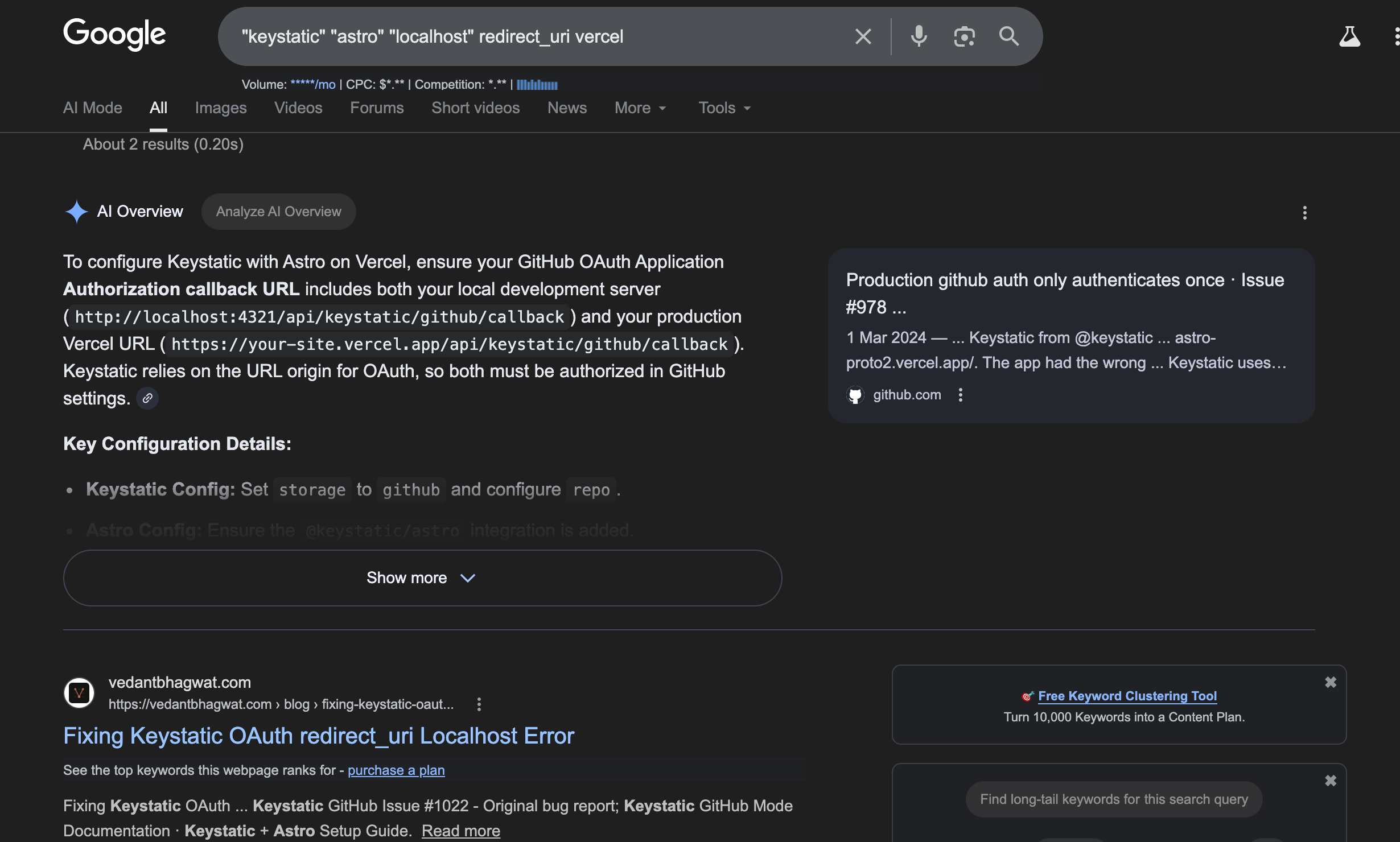
Search 1: Broad context capture
"keystatic" "astro" "localhost" redirect_uri vercelThe agent opens by capturing the full stack context. Framework (Astro), CMS (Keystatic), deployment platform (Vercel), environment (localhost), symptom (redirect_uri). This is the widest aperture in the fan-out. The goal is to find everything at the intersection of these components before narrowing.
Here’s the result I got when I searched those terms manually, and in that order:
Search 2: Boolean permutation for re-ranking
"astro" "keystatic" "vercel" "localhost" "redirect_uri"Nothing different here, just a reshuffling of order, also with every term now in exact match quotes. Search engines apply positional weighting in early terms, so re-ordering could surface different results.
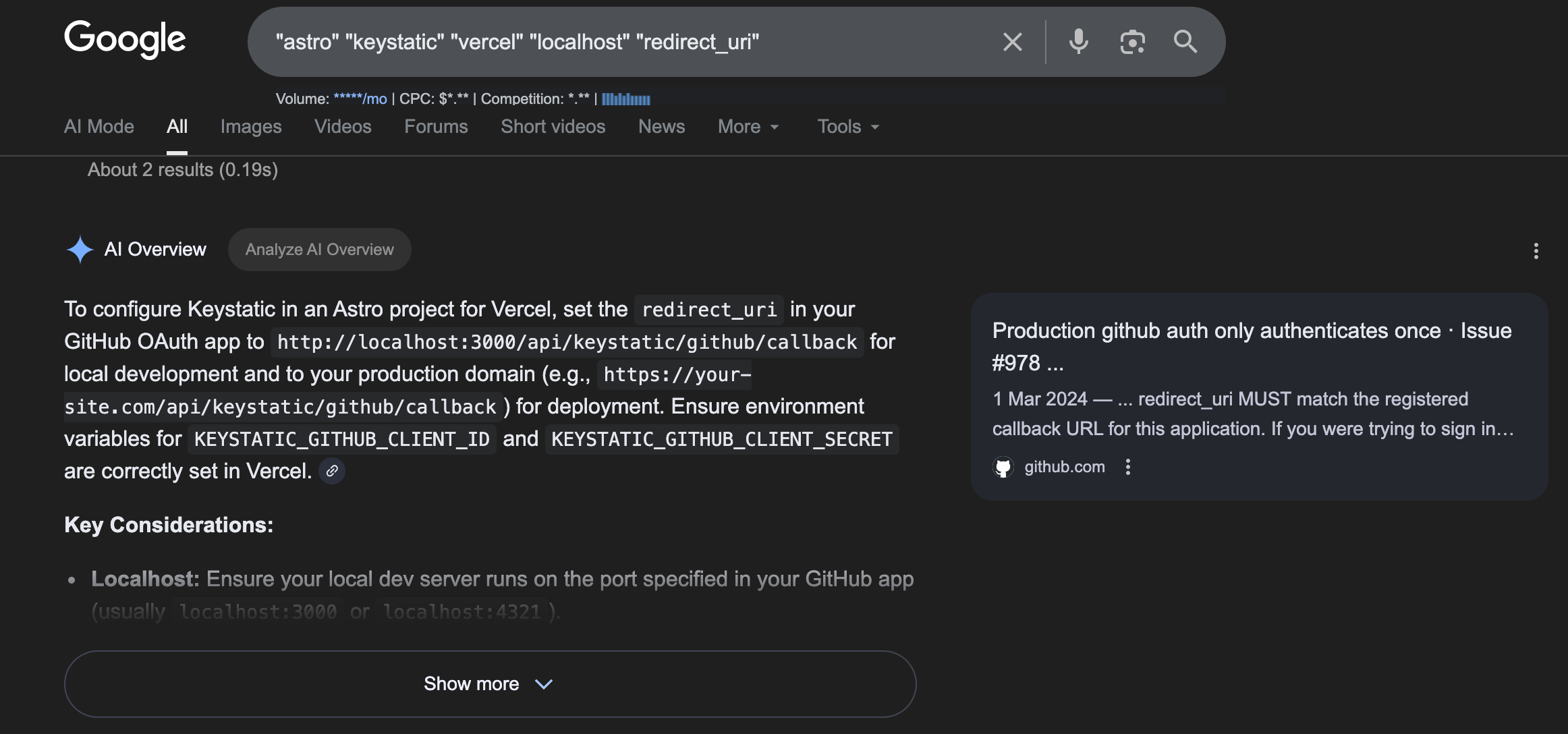
Note that nothing different here, except slight changes in phrasing and re-ordering of considerations by AI Overview. That’s because it’s a specific problem, and resources are limited online.
Search 3: Constraint injection
"keystatic" "astro" "github" "oauth" "localhost" "redirect_uri" "vercel"Between search 2 and 3, the agent logged “Analyzing URL Handling.” It inferred that redirect_uri failures in this specific stack almost always involve GitHub OAuth, so it performed constraint injection by adding github and oauth to filter out generic Vercel redirect errors and target the authentication handshake specifically.
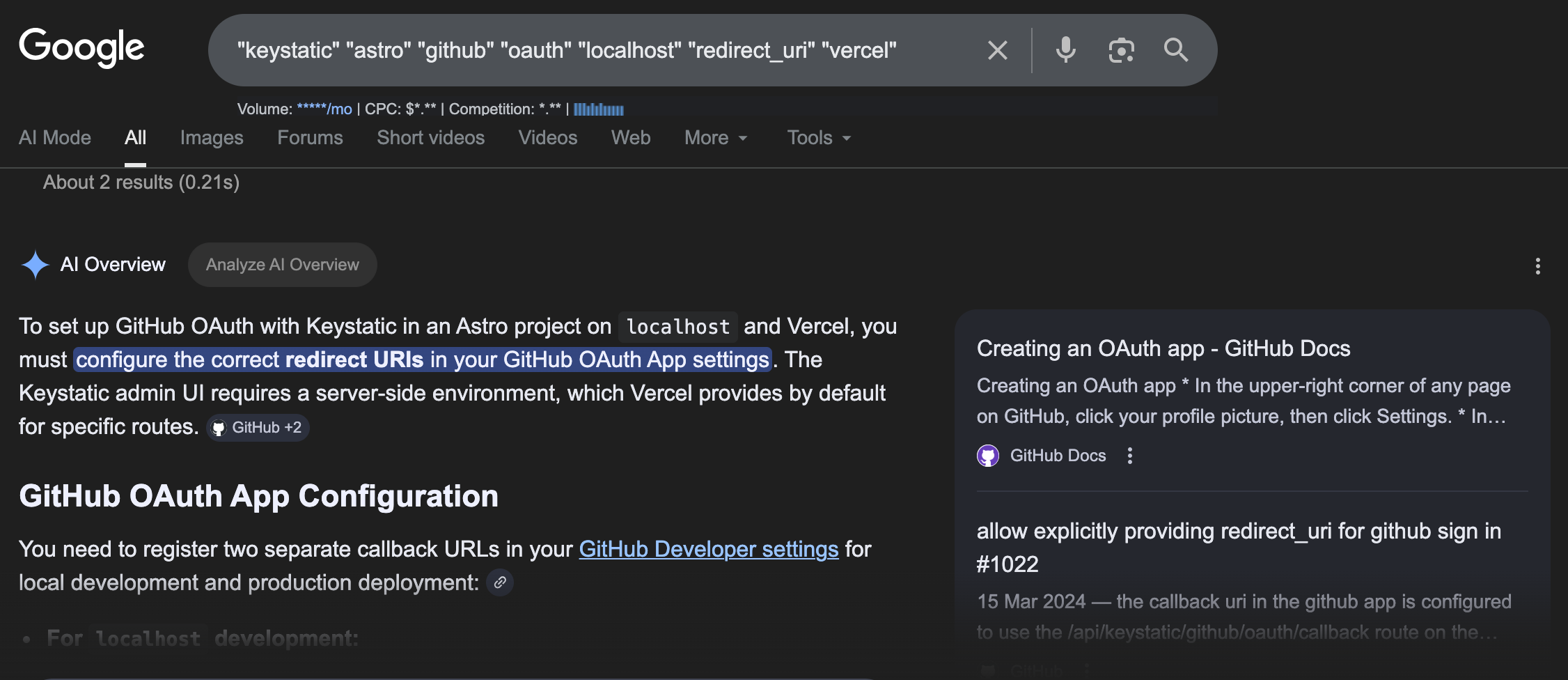
This is the most diagnostic search in the chain. The agent used its existing knowledge of OAuth flows to reformulate the query before running it, which is the core mechanic behind agentic search behavior.
Search 4: Literal string matching
"redirect_uri=https://localhost/api/keystatic/github/oauth/callback"The actual URL from my broken browser redirect, searched verbatim. The agent shifted from topical search to exact string retrieval, looking for the precise fingerprint of this error in GitHub issues, forum threads, or documentation.
And… oh! Such a URL didn’t exist.
Search 5: Entity-specific domain search
"vedantbhagwat.com" "keystatic" "redirect_uri"The agent identified a partial match from a specific person’s site in an earlier search and returned to verify it. It searched their domain directly alongside the relevant terms, an entity-specific retrieval step that signals the agent found that source authoritative (or useful) for this particular reasoning chain. It didn’t matter the overall domain authority of the site.
What this pattern means for your Agentic SEO and content strategy
With the above patterns, we could deduce a whole lot of facts:
- AI agents search by problem state
The word localhost appears in every search. The agent included it because that’s where the user’s problem was happening. This is what’s called problem state search, where the agent is trying to match the exact environment the user is stuck in. This includes the platform, the runtime, and the error context.
Most technical content is written for the ‘learning state” (setup guides, onboarding docs). Problem state search is hunting for content written for the “broken state” (debugging, deployment failures, config mismatches). These require different writing decisions, and most content only covers one.
Some action points:
- Audit your existing content for environment specificity. Go through your top-performing technical posts and check whether they name the specific runtime environments where problems occur.
- Add a “Common deployment issues” or “Debugging in local vs. production” section that explicitly names the environment (Vercel, Railway, Docker, localhost) alongside the symptom.
These additions cost little to write and dramatically increase your surface area for problem-state queries.
- Exact match operators filter out topical content
Every term in these searches was wrapped in double quotes. The agent was running Boolean retrieval, such that pages that don’t contain those precise strings are excluded from search results, regardless of topical relevance.
Content that uses approximate language, phrases like “in your deployment configuration” or “when handling authentication callbacks,” fails the exact match filter. Content that includes the actual error string, the exact environment, or the specific config key gets retrieved.
An action point:
- You might want to add an ‘Error reference” section to your technical guides. After your main walkthrough, include a section that lists the exact error strings, CLI output, and config keys readers might encounter. Format them as code blocks so they’re indexed as literal strings.
This is the content that survives Boolean exact match filtering. You can seed these sections by scanning the GitHub Issues and Stack Overflow threads for the tools you write about and lifting the exact error messages people are reporting.
- Query fan-out rewards entity proximity
Antigravity searched for Keystatic, Vercel, GitHub OAuth, and localhost simultaneously in the same section, with a clear relationship described between them.
A Keystatic guide that mentions Vercel in a footer note doesn’t match a fan-out query that includes both terms in the exact-match search. Entity proximity means the tools need to be discussed in relation to each other, in the same paragraph, as they actually interact with the problem.
Some action points:
- Map your content to stack combinations, not just individual tools. For every tool you cover, write sections specifically about how it behaves with the two or three platforms your audience uses most. “Keystatic on Vercel with GitHub OAuth” is a prime example.
- Use Google’s People Also Ask boxes for your core topics to reverse-engineer the stack combinations your audience is actively troubleshooting. Each PAA question is effectively a fan-out sub-query made public. For more advanced PAA, a tool like AlsoAsked by Mark comes in handy.
- Reasoning agents require a cause-and-effect structure
The agent was running a diagnostic loop by forming a hypothesis, searching for evidence, updating the hypothesis, and searching again. Each search was a hypothesis test.
Content that gets extracted at each step of that loop is structured diagnostically:
- Here’s the symptom
- Here’s the most likely cause, given the specific stack
- Here’s the specific configuration change
- Here’s how you verify the fix.
For instance, this is one of the blogs that was primarily surfaced during the whole diagnostic looping:
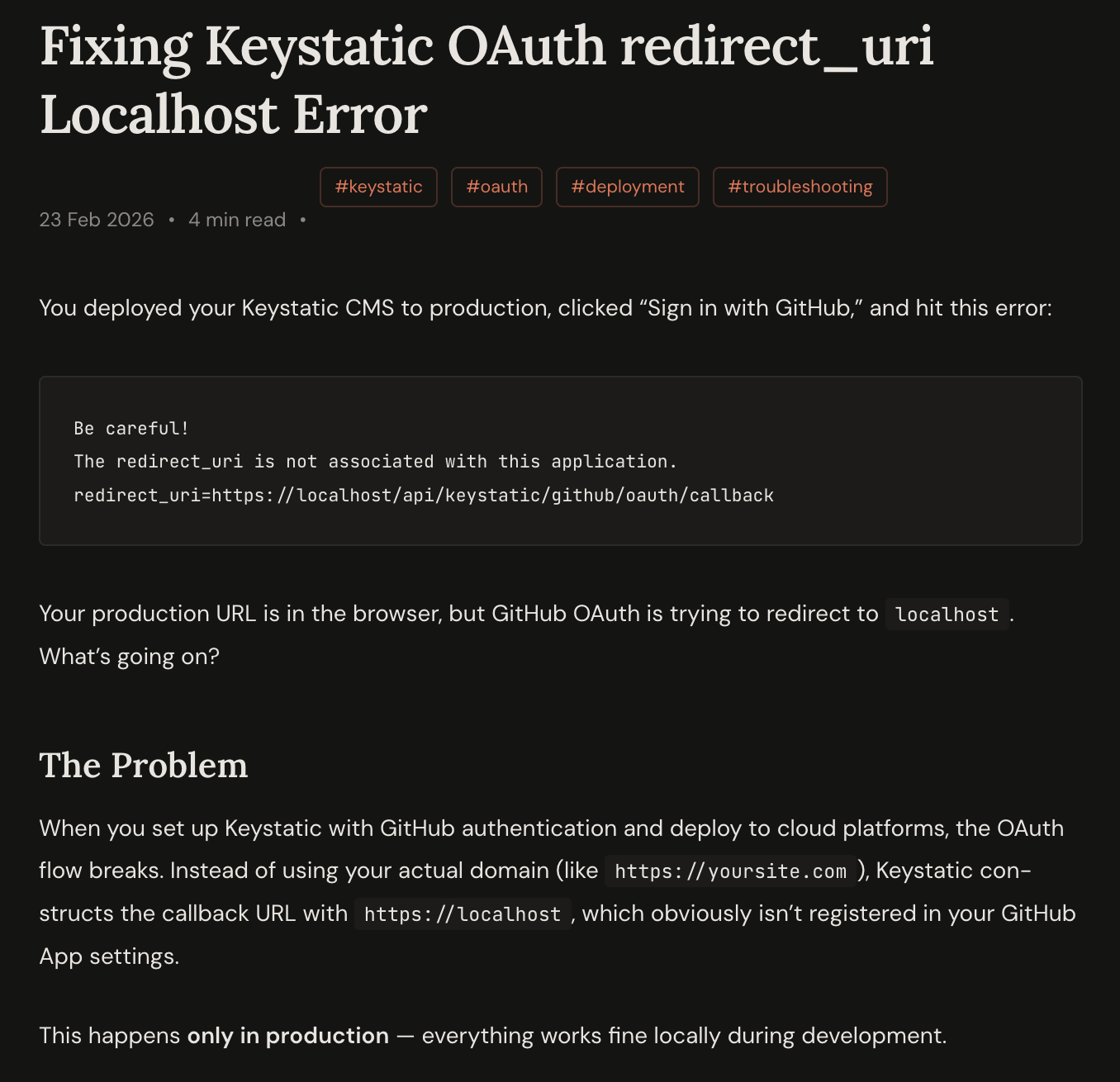
General setup guides structured from installation forward don’t intersect with a reasoning chain that starts from a broken state and works backward to a cause.
Action point:
- Add a diagnostic section to every technical guide you publish. You can format it as: “If you see [exact error], the most likely cause in [specific environment] is [specific check].” This structure is directly consumable by an agent running a diagnostic loop. It answers the hypothesis at each step. Even adding one or two of these per article significantly increases extractability.
How to find the exact queries to target
Although I mentioned some tools earlier, such as the PAA or AlsoAsked, you can use to find related queries, the fan-out queries the AI agent runs are largely invisible to standard keyword tools. Here’s how I plan to reverse-engineer them.
- The recursive AI method
Ask a reasoning model this prompt directly:
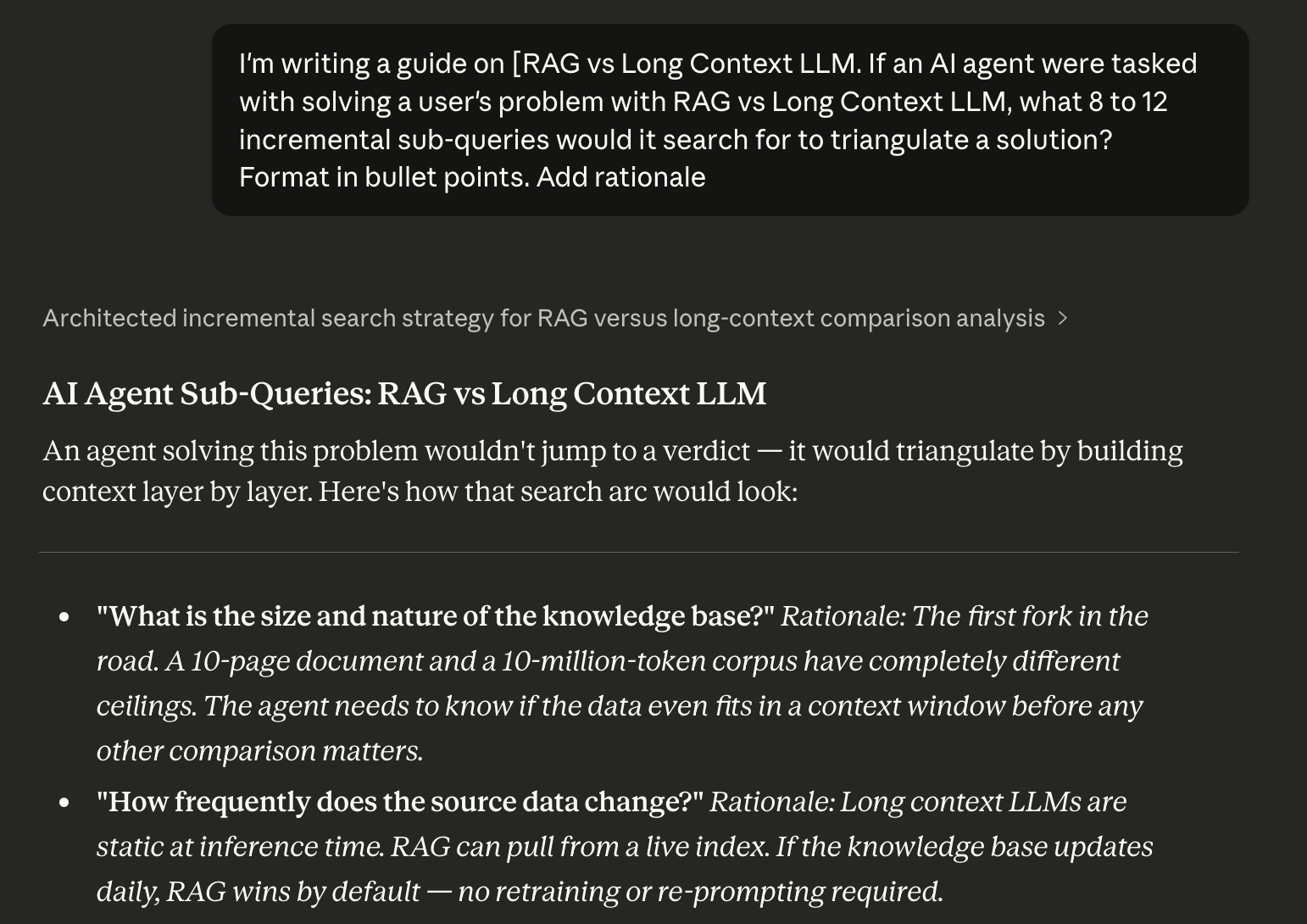
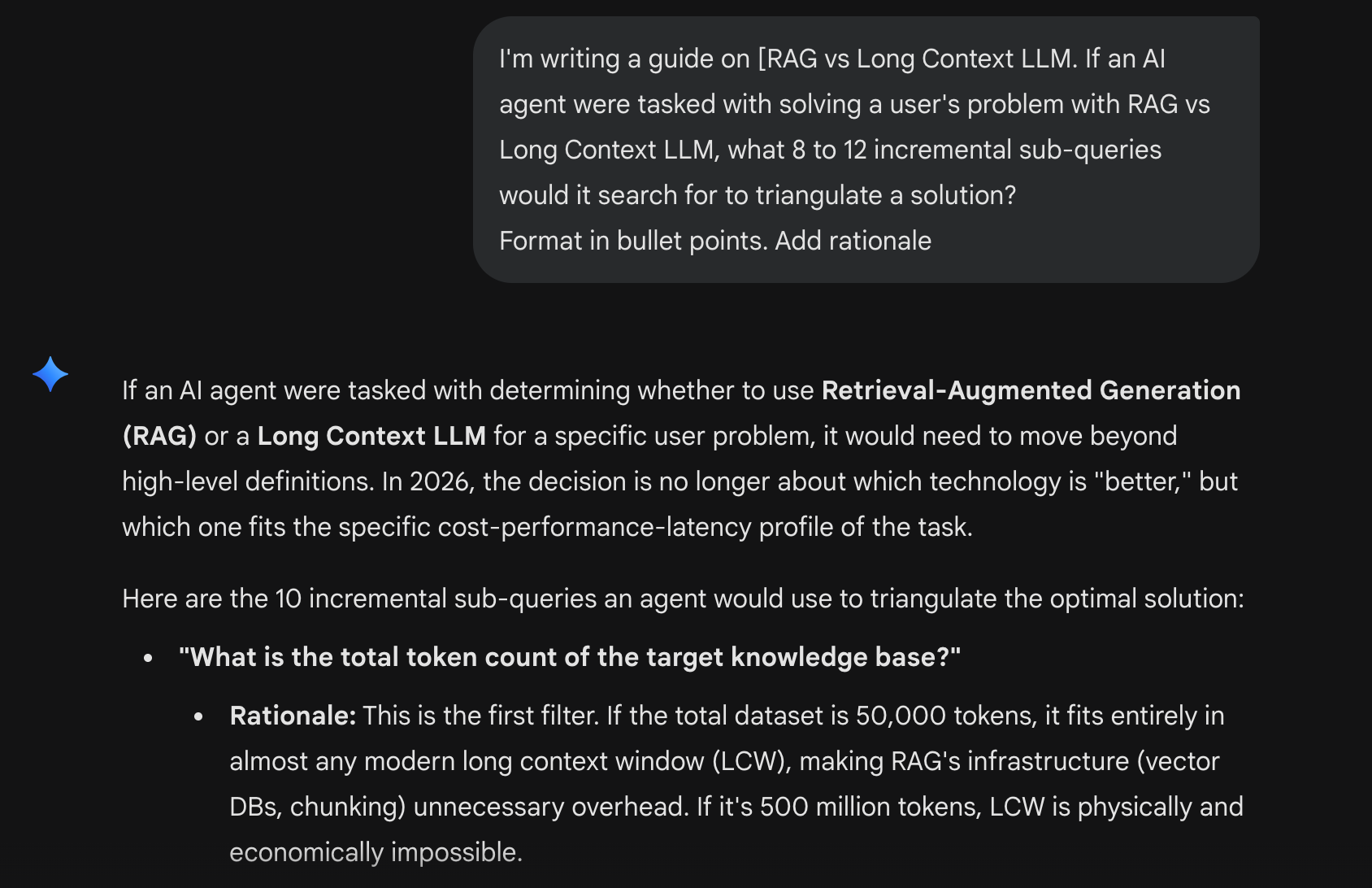
"I'm writing a guide on [your topic]. If an AI agent were tasked with solving a user's problem with [topic], what 8 to 12 incremental sub-queries would it search for to triangulate a solution?"To test this, I ran the prompt across Claude, Gemini, and ChatGPT using “RAG vs Long context LLM” as the topic.
Here’s the result with Claude:
The result with Gemini:
The same prompt with ChatGPT
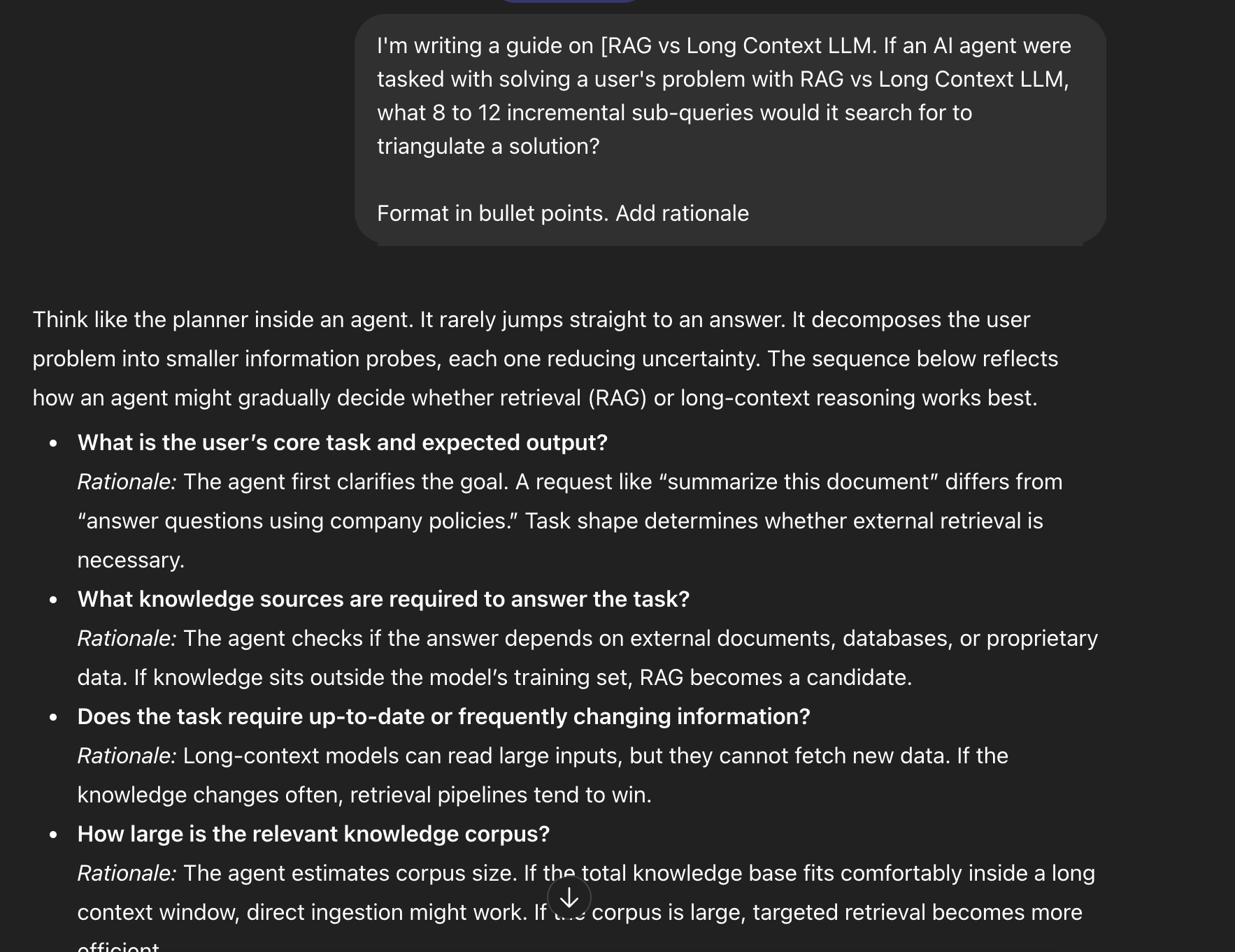
All three produced 10 to 12 sub-queries as requested. The overlap was on corpus size, data freshness, latency constraints, multi-hop reasoning, and hallucination sensitivity. We can take those as signals. When three different models independently surface the same sub-queries, those are the questions an agent will almost certainly run when a user asks about your topic. They become your H2 targets.
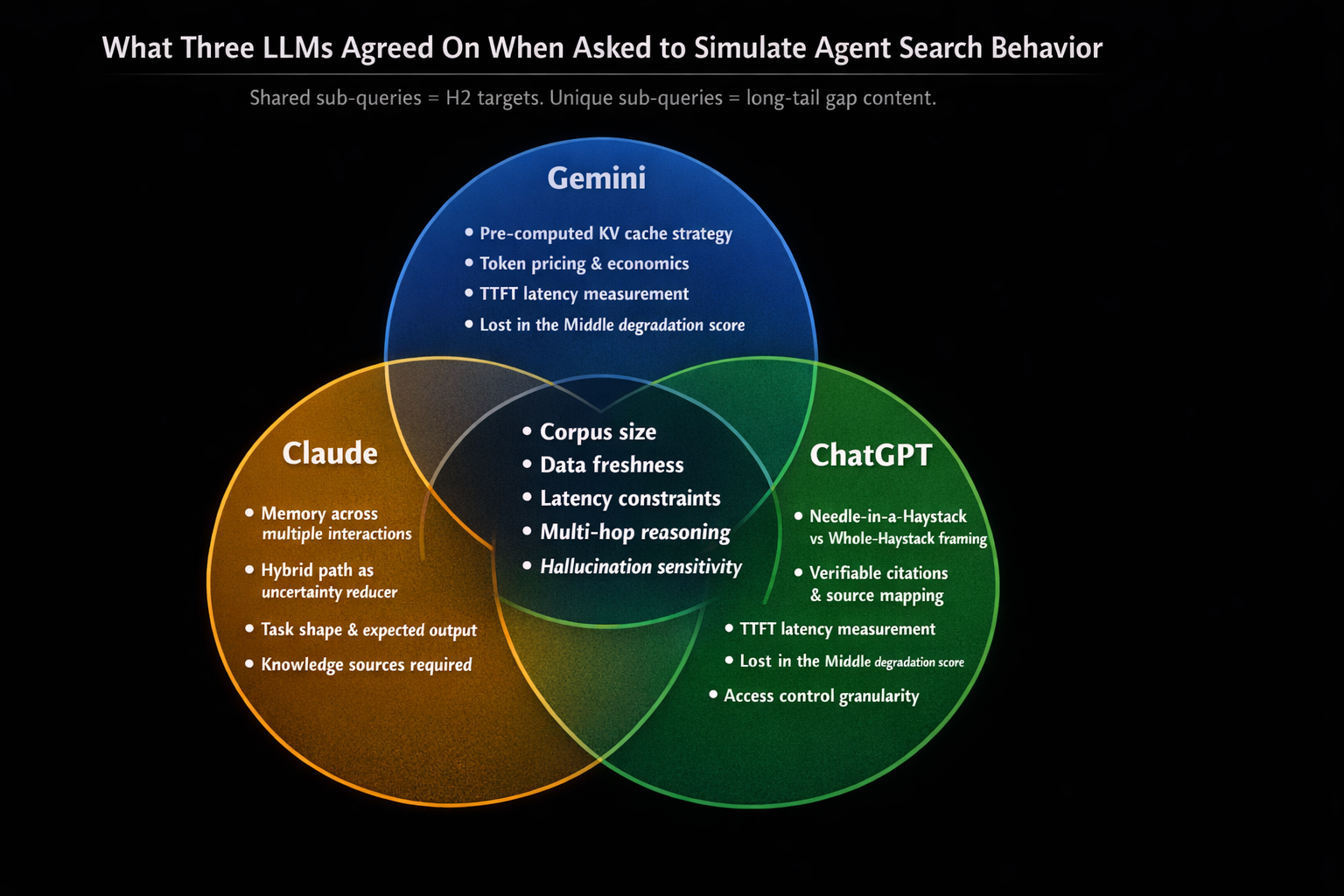
The divergence is equally useful. Gemini surfaced a “pre-computed KV cached strategy” and priced it against specific token economics. Claude raised “memory across multiple interactions” and “hybrid path as uncertainty reducer.” These are constraint-injection steps that the other models skipped, and could represent the long-tail sections your competitors are unlikely to have written.
Pro-tip You should expect some variability in your results, as these results are personalized to some extent. Run the prompt across two or three models, take the union of sub-queries as your content structure, and pay attention to the queries that appear in only one response. Those are the gaps with the least content competition and the highest specificity for an agent mid-reasoning.
- GitHub issues mining
Search GitHub issues for the tools you cover. Filter by “closed” issues where someone found a solution. The exact error strings in those threads are your content targets. People paste terminal outputs, config files, and error logs directly into issues. These are the literal strings agents search for in exact-match mode. If you reference those strings in your content alongside the solution, your content becomes a direct match for problem-state retrieval.
- Search Console fan-out identification
In Google Search Console, filter for queries with high impressions and low clicks on your technical pages. These are queries where Google is likely using your content to answer directly in AI Overview without sending traffic. Double down on those pages by expanding the environmental specificity and adding exact error strings.
You already have the signal that an agent finds your content relevant for that topic. The expansion makes your content more extractable.
- People Also Ask as a fan-out map
I mentioned this in passing, but it’s worth reiterating. The PAA boxes on technical queries are a public map of the agent’s internal fan-out logic. Each PAA question is a sub-query that the reasoning chain is likely to run. If you’re writing about a topic and there are six PAA questions below the first result, those six questions are your content structure. Address each one with a diagnostic answer format (symptom, cause, fix, verification) in its own section. AlsoAsked is an enriched query-sourcing tool you can also use.
- The 404 Hallucination Method
A few days ago, I stumbled on a post from Tim Soulo, CMO at Ahrefs, that I think belongs here. He noticed hundreds of Ahrefs Blog 404 pages accumulating backlinks, URLs like /content-decay and /internal-linking that never existed. They were hallucinated by AI-generated content across the web, links to resources that AI models expected to find on the Ahrefs domain but couldn’t.
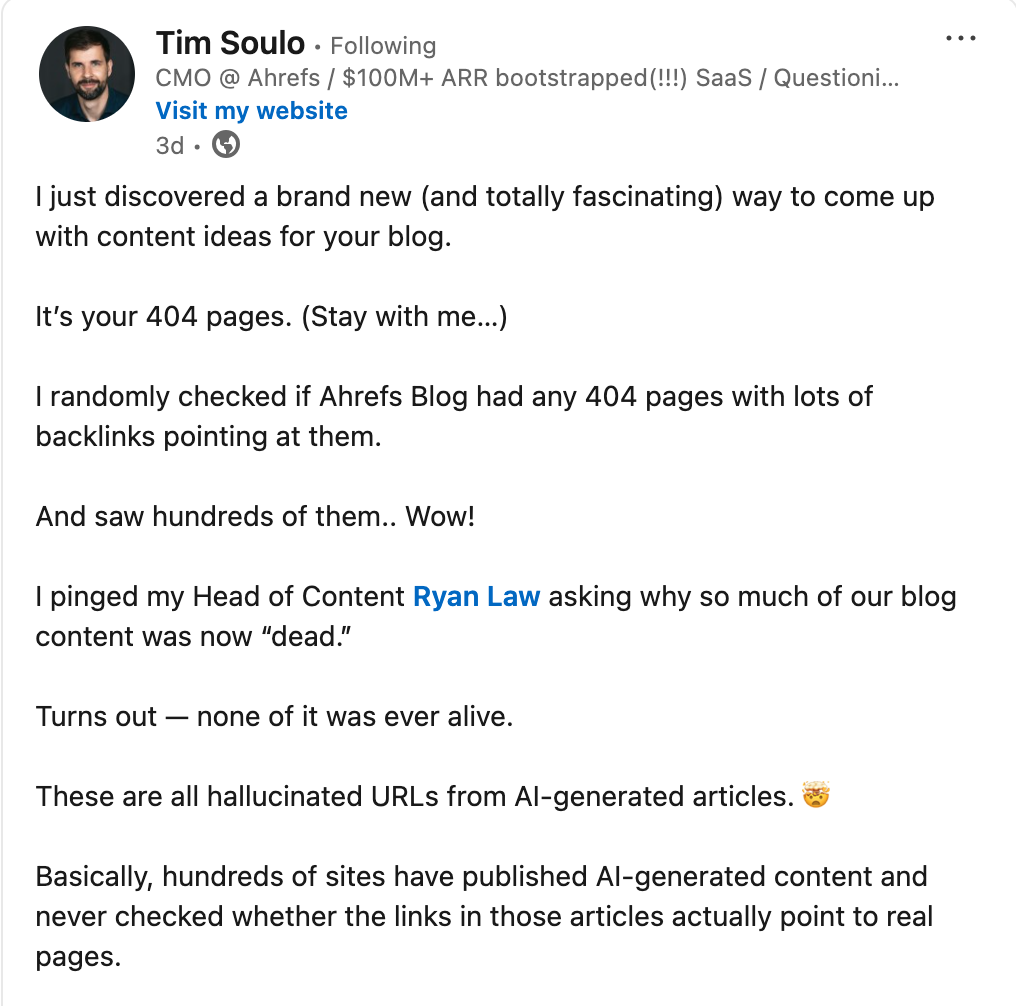
Tim’s read was that those URLs are content gap signals. The deeper read is that each one is a citation failure where an agent, mid-reasoning, reached for a resource, found nothing, and moved on.
If you run a blog with a meaningful publishing history, check your 404s with backlinks. In Ahrefs, go to Site Explorer > “Best by links” > filter by 404 status code. The hallucinated URLs clustering around your domain are a direct map of what agents expect to find in your topic cluster. Those are your highest-priority content targets.
The shift in how content value works
As a user running this debugging session, I never saw a search results page. Antigravity synthesized the answer and presented it directly. The content that contributed to that answer generated no clicks and sessions, and may or may not have generated an analytics event. The pages extracted into that answer qualified because individual sections, sometimes 60 words, matched the agent’s reasoning at a specific step.
This is what makes “share of citation” a meaningful content metric alongside traditional ranking metrics. An agent is using your content to build its answer. That’s influence, and it happened entirely outside the click.
The diagnostic content format described here is the mechanism for capturing that influence through specific environments, exact strings, entity proximity, cause-and-effect structure, and sections that stand alone as complete answers to sub-problems.
Before I drop off, let me leave you with a quick content audit checklist you can start using right now to assess your technical page.
Content audit checklist
- Atomicity — Can a single section stand alone as a complete answer to a specific sub-problem?
- String specificity — Does the page include actual error messages, config keys, file paths, and environment variable names as literal strings?
- Environment explicitness — Does the page name the specific platform and runtime where the problem occurs?
- Entity proximity — Are the relevant tools connected in context within the same section?
- Diagnostic structure — Does the page follow cause-and-effect logic: symptom → cause → fix → verification?
Pages that answer yes to all five are the ones that participate in a reasoning agent’s fan-out chain.
FYI, I couldn’t fix that bug, or maybe I didn’t have that much patience, and had to migrate from Keystatic to Hashnode. Okay, bye! 😂👋